Showing posts with label Popular. Show all posts

Angular CLI - export 'CDK_TREE_NODE_OUTLET_NODE' was not found


styles.cssBrowserslist: caniuse-lite is outdated. Please run next command `npm update caniuse-lite browserslist


WARNING in ./node_modules/@angular/material/esm5/tree.es5.js 38:63-88
"export 'CDK_TREE_NODE_OUTLET_NODE' was not found in '@angular/cdk/tree'

WARNING in ./node_modules/@angular/material/esm5/tree.es5.js 168:35-60
"export 'CDK_TREE_NODE_OUTLET_NODE' was not found in '@angular/cdk/tree'

WARNING in ./node_modules/@angular/material/esm5/stepper.es5.js 314:83-105
"export 'STEPPER_GLOBAL_OPTIONS' was not found in '@angular/cdk/stepper'
i 「wdm」: Compiled with warnings.


Asp.net MVC | Beginning | without database | create model and simple view | Edit and List page

Go to model folder > Right click > add > class > student.cs


using System.ComponentModel.DataAnnotations;

namespace WebApplication1.Models
{
    public class Student
        {
            public int StudentId { get; set; }

            [Display(Name = "Name")]
            public string StudentName { get; set; }

            public int Age { get; set; }
            [Display(Name ="Image")]
            public string imgPath { get; set; }
        }
   
}


Go to controller Folder > Right click > Add> Controller > Student

using System;
using System.Collections.Generic;
using System.Linq;
using System.Web.Mvc;
using WebApplication1.Models;

namespace WebApplication1.Controllers
{
    public class StudentController : Controller
    {
        IList studentList = new List() {
                    new Student(){ StudentId=1, StudentName="John", Age = 28, imgPath="images/close.png" },
                    new Student(){ StudentId=2, StudentName="Steve", Age = 25 ,imgPath="images/code.png"},
                 new Student(){ StudentId=3, StudentName="Rob", Age =21,imgPath="images/fileupload.png"},
                    };

        public ActionResult Edit(int Id)
        {
            var std = studentList.Where(s => s.StudentId == Id).FirstOrDefault();

            return View(std);
        }
        public ActionResult Index()
        {
            return View(studentList);           
        }
        [HttpPost]
        public ActionResult Edit(int id, FormCollection collection)
        {
            try
            {
                return RedirectToAction("Index");
            }
            catch
            {
                return View();
            }
        }

     
    }
}


Create view for Index and Edit
on Controller Page > Right click inside Index Action Method > Add View
Opening .... Index.cshtml

@model IEnumerable

@{
    Layout = null;
}


    Index
   
        @Html.ActionLink("Create New", "Create")


                @Html.DisplayNameFor(model => model.StudentName)
           
           
                @Html.DisplayNameFor(model => model.Age)
           
           
                @Html.DisplayNameFor(model => model.imgPath)


    @foreach (var item in Model) {
   
       
            @Html.DisplayFor(modelItem => item.StudentName)
       
       
            @Html.DisplayFor(modelItem => item.Age)


            @Html.ActionLink("Edit", "Edit", new { id = item.StudentId }) |
            @Html.ActionLink("Details", "Details", new { id = item.StudentId }) |
            @Html.ActionLink("Delete", "Delete", new { id = item.StudentId })
       
   
    }


Go to controller > Edit action method > Right Click> Add View
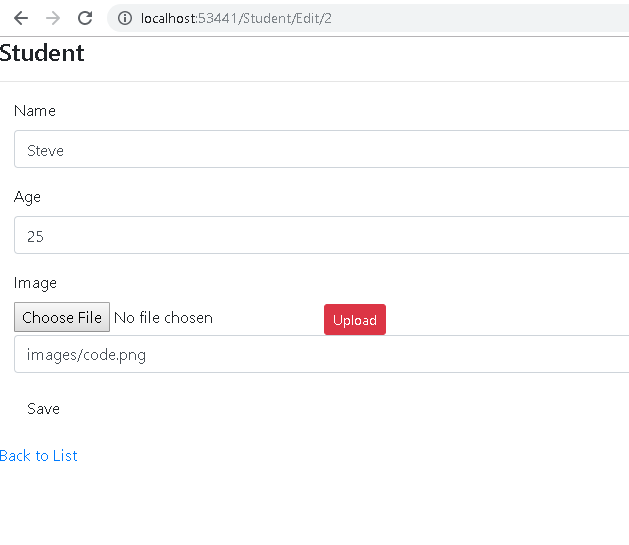
Edit.cshtml


@model WebApplication1.Models.Student

@{
    Layout = null;
}


    Edit
   
    @using (Html.BeginForm())
    {
        @Html.AntiForgeryToken()


Student

           
            @Html.ValidationSummary(true, "", new { @class = "text-danger" })
            @Html.HiddenFor(model => model.StudentId)

           
                @Html.LabelFor(model => model.StudentName, htmlAttributes: new { @class = "control-label col-md-2" })
               
                    @Html.EditorFor(model => model.StudentName, new { htmlAttributes = new { @class = "form-control" } })
                    @Html.ValidationMessageFor(model => model.StudentName, "", new { @class = "text-danger" })


                @Html.LabelFor(model => model.Age, htmlAttributes: new { @class = "control-label col-md-2" })
               
                    @Html.EditorFor(model => model.Age, new { htmlAttributes = new { @class = "form-control" } })
                    @Html.ValidationMessageFor(model => model.Age, "", new { @class = "text-danger" })


                @Html.LabelFor(model => model.imgPath, htmlAttributes: new { @class = "control-label col-md-2" })
               
                   
                    Upload
                    @Html.EditorFor(model => model.imgPath, new { htmlAttributes = new { @class = "form-control",@id="furl" } })


    }

   
        @Html.ActionLink("Back to List", "Index")


All in One | 1 Program that implement the concept of Method overriding, Methods Hidding / Abstraction and polymorphism.


  1. Base class references [a, b, c] can implement the method of child class prin() method that concept is Polymorphism
  2. Use override keyword implement Method Overriding
  3.  Use new keyword in child class that implement the concept of Method Hidding or Abstraction


Social Media